
The best Alias for ls
The best alias for ls is
ls –halF
It is easy to remember, and produces easy to read output with human readable file sizes and / marks present by the directory names.
Document z240302wa, last modified 2 March, 2024
The best alias for ls is
ls –halF
It is easy to remember, and produces easy to read output with human readable file sizes and / marks present by the directory names.
Document z240302wa, last modified 2 March, 2024
dnf install oracle-epel-release-el9
dnf install iftop
iptraf is already in the default repositories.
A really good version of the ll alias is:
ls –lahF, although on some versions ls –lahp looks better than F.
Some useful aliases that are not always preconfigured on every Linux version:
alias ll=’ls -alF’
alias la=’ls -A’
alias l=’ls –CF’
To eliminate the DRM warning in Firefox and Librewolf without enable DRM, add this to “userChrome.css”:
notification[value="drmContentDisabled"]{ display:none !important; }
toolkit.legacyUserProfileCustomizations.stylesheets must be set to true in about config.
The following script scans PDFs via an auto-document feeder in Hp-Lip and then collates the pages to the correct order when there are reverse sides. No scans will be saved if no data is transmitted for the second set of scans. The second set of scans is the reverse of the pages.
#!/usr/bin/env bash
YMD=$(date +"%Y-%m-%d")
Y=$(date +"%Y")
WORKDIR=/home/username/Temp/
OUTPATH=/home/username/Scans/${Y}/
# Create a folder, ~/Temp and create a folder, ~/Scans
mkdir -p "/home/username/Scans/${Y}"
hp-scan --adf --mode=color &&
PART=hpscan
LATESTSCAN=`ls -t ${PART}*pdf | sed "1q"`
echo "${LATESTSCAN} ready for ${FILEOUTPUT}"
# Why you shouldn't parse the output of ls
# http://mywiki.wooledge.org/ParsingLs
# This does not use the FILEOUTPUT variable itself because the cp command
# seems to have trouble copying the file correctly, even with switches.
# Thanks Elektropepi at https://github.com/qpdf/qpdf/issues/259
function pdfscanmerge() {
if [ $# -ne 3 ]; then
echo "Usage: pdfscanmerge
Here is a script that checks to ensure the database is running and restarts the service if it is not running. This was used on a very low memory server to ensure a database remained operational, despite it sometimes crashing due to out of memory errors.
#!/bin/bash

timestamp="$(date)"
systemctl stop httpd && echo "${timestamp}" Stopping Apache... >> /home/centos/administration/apache.log
systemctl is-active mariadb && echo "${timestamp}" MariaDB is active so not starting >> /home/centos/administration/mariadb_active.log || echo "${timestamp}" MariaDB is not Active >> /home/centos/administration/mariadb_inactive.log
systemctl is-active mariadb && echo "${timestamp}" No need to restart MariaDB || systemctl start mariadb
systemctl start httpd && echo "${timestamp}" restarting apache...>> /home/centos/administration/apache.log
To install AppImages and integrate them with the desktop environment like a conventional package, use the AppImage Launcher. LibreWolf’s documentation contains a how-to document on using AppImage Launcher.
Revisions: 21 January 2024, first publication
The Thunderbird developers are moving to a new user interface code base for Thunderbird 115 and Thunderbird 102 is the last version that will work with the historical userChrome.css customizations. The userbase for Mozilla products has continually shrunk over the past few years and the chances of equivalent customization abilities being discovered and written about strike me as pretty low. Because of the change, I have mirrored Thunderbird 102.14 for Windows and Linux in 64-bit and 32-bit versions in the event that the old versions disappear from the Mozilla site. The Source is available on the Mozilla mirror as of August 11, 2023. The releases are located here.
The userChrome.css below allows the following persistent tag colors. It also contains text customization for the interface. And it contains alternate row highlighting, where one row is light grey and the other white. The alternate row highlighting conflicts with the background colors for tags. One must choose which feature to have. The userChrome.css goes in the profile directory in a subfolder called chrome.
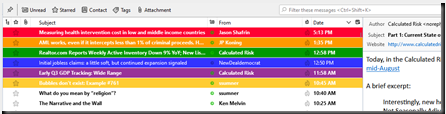
The code for highlighting the tag backgrounds was found on a French website located here. E.g. C:\Users\username\AppData\Roaming\Thunderbird\Profiles\1a2b3cde.default-release\chrome
@namespace url("http://www.mozilla.org/keymaster/gatekeeper/there.is.only.xul");
/* set default namespace to XUL */
/* thanks to Jean-Claude, */
/* https://forums.mozfr.org/viewtopic.php?t=143173 */
/*Important tag IMPORTANT*/
treechildren::-moz-tree-row(T_24label1)
{
      border-bottom: 1px solid #FFFFFF !important;
      background-color:  #FF0033   !important;
}
treechildren::-moz-tree-cell-text(T_24label1)
{
      color: #FFFFFF !important;
}
treechildren::-moz-tree-row(T_24label1, selected)
{
      background-color: #b71c1c !important;
}
treechildren::-moz-tree-cell-text(T_24label1, selected)
{
  color: #00FF00  !important;
}

/*Travail tag   WORK*/
treechildren::-moz-tree-row(T_24label2)
{
  border-bottom: 1px solid #FFFFFF !important;
  background-color:  #FF9900   !important;
}
treechildren::-moz-tree-cell-text(T_24label2)
{
  color: #FFFFFF !important;
}
treechildren::-moz-tree-row(T_24label2, selected)
{
  background-color: #FF9900 !important;
}
treechildren::-moz-tree-cell-text(T_24label2, selected)
{
  color: #00FF00  !important;
}

/*Personnel tag PERSONAL*/
treechildren::-moz-tree-row(T_24label3)
{
  border-bottom: 1px solid #FFFFFF !important;
  background-color:  #009900   !important;
}
treechildren::-moz-tree-cell-text(T_24label3)
{
  color: #FFFFFF !important;
}
treechildren::-moz-tree-row(T_24label3, selected)
{
  background-color: #009900 !important;
}
treechildren::-moz-tree-cell-text(T_24label3, selected)
{
  color: #00FF00  !important;
}

/*A faire tag*/
treechildren::-moz-tree-row(T_24label4)
{
  border-bottom: 1px solid #FFFFFF !important;
  background-color:  #3333FF   !important;
}
treechildren::-moz-tree-cell-text(T_24label4)
{
  color: #FFFFFF !important;
}
treechildren::-moz-tree-row(T_24label4, selected)
{
  background-color: #3333FF !important;
}
treechildren::-moz-tree-cell-text(T_24label4, selected)
{
  color: #00FF00  !important;
}

/*Peut attendre tag*/
treechildren::-moz-tree-row(T_24label5)
{
  border-bottom: 1px solid #FFFFFF !important;
  background-color:  #993399  !important;
}
treechildren::-moz-tree-cell-text(T_24label5)
{
  color: #FFFFFF !important;
}
treechildren::-moz-tree-row(T_24label5, selected)
{
  background-color: #993399 !important;
}
treechildren::-moz-tree-cell-text(T_24label5, selected)
{
  color: #00FF00  !important;
}

/*test tag*/
treechildren::-moz-tree-row(Ttest)
{
  border-bottom: 1px solid #FFFFFF !important;
  background-color:  #FFCC33  !important;
}
treechildren::-moz-tree-cell-text(Ttest)
{
  color: #FFFFFF !important;
}
treechildren::-moz-tree-row(Ttest, selected)
{
  background-color: #FFCC33 !important;
}
treechildren::-moz-tree-cell-text(Ttest, selected)
{
  color: #00FF00  !important;
}

/* 9 August 2023 Additions */
/* Set Font Size In Folder Pane */

#folderTree >treechildren::-moz-tree-cell-text {
  /*font-family: Lucida Sans !important;*/
  font-size: 9pt !important; }

/* Set Font Size In Thread Pane */

#threadTree >treechildren::-moz-tree-cell-text {
  /*font-family: Lucida Sans !important;*/
  font-size: 9pt !important; }

#threadTree treechildren::-moz-tree-row    {
/*  border-bottom: 1px dotted grey !important;  */
  height: 24px !important; }

/* folder list spacing */

#folderTree treechildren::-moz-tree-row    {
  height: 24px !important; }

/* The silver background color on alternating rows */
#threadTree treechildren::-moz-tree-row(odd) {
  -moz-appearance: none !important;
  background-image: none !important;
  /* the !important property overrides previous styling rules */
  /* this line enables alternate color row highlighting, but
  tag backgrounds on this row cannot be highlighted.  Only one
  background highlighting can be applied Disabled 9 August 2023
  to enable tag background highlights*/
  /* background-color:#F3F6FA !important; */

}

#threadTree treechildren::-moz-tree-row(selected) {
  background-color: -moz-Dialog !important;
}
#threadTree treechildren::-moz-tree-row(selected, focus) {
  background-color: Highlight !important;
}

#folderTree treechildren::-moz-tree-row(selected) {
  -moz-appearance: none !important;
  background-image: none !important;
  background-color: Highlight !important;
}
#folderTree treechildren::-moz-tree-row(selected, focus) {
  -moz-appearance: none !important;
  background-image: none !important;
  background-color: Highlight !important;
}
This is the code for a function in Bash script.
 #!/bin/bash
 # Define a function
 greet() {
 echo "Hello, $1"
 }
 # Call the function with "World" as the argument
 greet "World"
To loop through the subdirectories in a folder, when those subdirectories may contain spaces in the file names, use the following procedure.
OLD_IFS=$IFS && IFS=$'\n'
 for directory in $HOME/somefolder/*/; do
 echo “some code here”
 done
 IFS=$OLD_IFS
This document contains some notes on .bashrc for use with Linux systems.
alias ll=’ls -alF’
alias la=’ls -A’
alias l=’ls –CF’
if [ -f ~/.bash_aliases ]; then
. ~/.bash_aliases
fi
The preceding two blocks come standard on Ubuntu as of version 2022.04. One tweak for WSL2 on Windows might be the addition of this line.
sudo bash “/etc/rc.local”
and in the rc.local follow, add the following.
#!/bin/bash
rm -f /etc/resolv.conf
echo “nameserver 1.1.1.1″ >> /etc/resolv.conf
echo “nameserver 8.8.8.8″ >> /etc/resolv.conf
This is because WSL2 may place non-routable IP addresses using 172… in resolv.conf. As of this writing, following steps recommended to disable the generation of the file fails to resolve the issue where the file is newly generated with every new terminal launched in Windows terminal. Having this run with each new Bash login ensures success with network communications. The location /etc/rc.local may seem like an odd location for this.
The crontab to ensure to check each minute to ensure a virtual machine is running in VirtualBox is as follows.
*/1 * * * * VBoxManage startvm “VMNAME” –type headless
*/1 * * * * VBoxManage startvm “VMNAME2″ –type headless
If the virtual machine is already running, then it will not start a new copy of it. This is better than attempting to run the script via a system wide script after a reboot. Running it this way allows a simple crontab for the user for whom the machine needs to run under. To run a script every five minutes, add the crontab as follows:
*/5 * * * * /home/USERNAME/nextcloudcron
In this example, the nextcloudcron script will run every five minutes. This particular script is one for use contacting my Nextcloud instance for webcron. It does not contain a .sh on the filename, because some implementations may disallow crontab scripts with file extensions.
The following checks inside a subdirectory and pulls in the files therein as bash sources. This is useful for breaking aliases, variables, and other items into different files.
if [ -d ~/.bashrc.d ]; then
for rc in ~/.bashrc.d/*; do
if [ -f "$rc" ]; then
. “$rc”
fi
done
fi
The following uses nano as the crontab editor.
export VISUAL=nano
On Oracle Linux 9 on AWS, it is necessary to install Cronie to enable cron jobs. To ensure this starts after reboots, add the following to /etc/rc.local.
bash /sbin/crond
To create a date line for a log file, use the following:
echo $(date) >> /home/USER/FILENAME
The Shebang for the top of bash files is
#!/usr/bin/env bash
To auto-update via DNF and leave a log of what was accomplished, use the following script. The script will write a list of the updates to the systemupdates.log file, and then update the system with details of that process written to the dnfupdates.log file.
#!/usr/bin/env bash
echo $(date) >> /home/USER/systemupdates.log
sudo dnf check-update >> /home/USER/systemupdates.log
echo $(date) >> /home/USER/dnfupdates.log
sudo dnf update -y >> /home/USER/dnfupdates.log 2>&1
7 July 2023:
Ubuntu 22.04′s update notifier seems to not include the option to configure any settings, at least after certain conditions exist on a particular system. To stop the notifier from appearing. To stop the notifier from appearing use
sudo apt-get remove update-notifier
7 July 2023:
There are non-snap builds of ungoogled-chromium for Ubuntu
6 July 2023 and prior:
To disable automatic updates on Ubuntu:
sudo dpkg-reconfigure unattended-upgrades
sudo apt remove packagekit
In .bashrc create the following alias:
alias nano="nano -c --guidestripe 80"
This will open always Nano with line and column numbering along with a long line marker at the specified column. The long line marker feature works for Nano version higher than 4, which doesn’t include the version in the CentOS 7 repositories.
In .bashrc add the following line:
export DISPLAY=\
"`grep nameserver /etc/resolv.conf | sed 's/nameserver //'`:0"
This adds the IP address of the instance to the display variable for use with Windows Subsystem for Linux and VcXsrv.
In .nanorc add the following items. The first two lines are commented because the command line switch used in the alias for the line numbers creates no artifacts when using copy-paste.
#set linenumbers
#set constantshow

# https://www.nano-editor.org/dist/latest/nanorc.5.html
set guidestripe 80

include /usr/share/nano/autoconf.nanorc
include /usr/share/nano/patch.nanorc
include /usr/share/nano/nanorc.nanorc
include /usr/share/nano/groff.nanorc
include /usr/share/nano/awk.nanorc
include /usr/share/nano/man.nanorc
include /usr/share/nano/java.nanorc
include /usr/share/nano/sh.nanorc
include /usr/share/nano/po.nanorc
include /usr/share/nano/texinfo.nanorc
include /usr/share/nano/python.nanorc
include /usr/share/nano/perl.nanorc
include /usr/share/nano/pov.nanorc
include /usr/share/nano/ocaml.nanorc
include /usr/share/nano/tcl.nanorc
include /usr/share/nano/debian.nanorc
include /usr/share/nano/lua.nanorc
include /usr/share/nano/xml.nanorc
include /usr/share/nano/gentoo.nanorc
include /usr/share/nano/objc.nanorc
include /usr/share/nano/tex.nanorc
include /usr/share/nano/guile.nanorc
include /usr/share/nano/php.nanorc
include /usr/share/nano/c.nanorc
include /usr/share/nano/nftables.nanorc
include /usr/share/nano/spec.nanorc
include /usr/share/nano/elisp.nanorc
include /usr/share/nano/ruby.nanorc
include /usr/share/nano/go.nanorc
include /usr/share/nano/nanohelp.nanorc
include /usr/share/nano/default.nanorc
include /usr/share/nano/json.nanorc
include /usr/share/nano/css.nanorc
include /usr/share/nano/mgp.nanorc
include /usr/share/nano/asm.nanorc
include /usr/share/nano/mutt.nanorc
include /usr/share/nano/javascript.nanorc
include /usr/share/nano/postgresql.nanorc
include /usr/share/nano/rust.nanorc
include /usr/share/nano/fortran.nanorc
include /usr/share/nano/cmake.nanorc
include /usr/share/nano/makefile.nanorc
include /usr/share/nano/html.nanorc
include /usr/share/nano/changelog.nanorc
Using Tar and Gzip:
tar -zcvf output_file_name[.tar.gz or .tgz] directory_to_compress
tar -Jcvf output_file_name[.tar.xz] directory_to_compress
reads compression level for XZ from environmental variable, but note that xz utils is not installed by default on ubuntu 10.04
tar -xvf works to extract .tar.gz file created like in the above
The Tar and Gzip commands use compression settings specified in .bashrc
export GZIP=-9

export XZ_OPT=-9
Add the following to .bashrc for a console calculator:
calc() { echo "$*" | bc -l; }
For the ll alias, use the following in .bashrc
alias ll='ls -alF'
To change the terminal name use the following in .bashrc. The command differs depending upon which version of Gnome one uses.
# For older versions of gnome-terminal
#shellrename() { read -p "Enter new shell name: " name && PROMPT_COMMAND='echo -ne "\033]0;${name}\007"'; }
# Works on OpenSUSE 15.3
#PS1=$PS1"\[\e]0;test1\a\]"
shellrename() { read -p "Enter new shell name: " name && PS1=$PS1"\[\e]0;${name}\a\]"; }
To obtain a uuid, add the following to .bashrc:
uuid() { UUID=$(cat /proc/sys/kernel/random/uuid) && echo $UUID;
Zen Burn color scheme for the terminal, but sometimes causes problems with work via SSH.
# Zen Burn
# Another old way that works great in gnome-terminal while causing problems
# in some configurations involving SSH:
echo -ne '\e]12;#BFBFBF\a'
echo -ne '\e]10;#DCDCCC\a'
echo -ne '\e]11;#3F3F3F\a'
echo -ne '\e]4;0;#3F3F3F\a'
echo -ne '\e]4;1;#705050\a'
echo -ne '\e]4;2;#60B48A\a'
echo -ne '\e]4;3;#DFAF8F\a'
echo -ne '\e]4;4;#506070\a'
echo -ne '\e]4;5;#DC8CC3\a'
echo -ne '\e]4;6;#8CD0D3\a'
echo -ne '\e]4;7;#DCDCCC\a'
echo -ne '\e]4;8;#709080\a'
echo -ne '\e]4;9;#DCA3A3\a'
echo -ne '\e]4;10;#C3BF9F\a'
echo -ne '\e]4;11;#F0DFAF\a'
echo -ne '\e]4;12;#94BFF3\a'
echo -ne '\e]4;13;#EC93D3\a'
Circa 2015: Adding Windows to CentOS 7 and Grub 2 after installing CentOS and no automatic configuration of Windows boot options. The file to manually edit is /etc/grub.d/40_custom.
menuentry "Windows 10 Professional" { set root=(hd0,1) chainloader +1 }
After editing, update Grub and reboot using the following command.
grub2-mkconfig –output=/boot/grub2/grub.cfg
The following shows one of the custom file contents circa 2018 or 2019 after some changes to installers and autodetection.
#!/bin/sh
exec tail -n +3 $0
# This file provides an easy way to add custom menu entries. Simply type the menu entries you want to add after this comment.
# Be careful not to change the 'exec tail' line above.
menuentry "Windows (system) (on /dev/sda1)" --class windows --class os { insmod part_msdos insmod ntfs insmod ntldr set root='(hd0,msdos1)' ntldr ($root)/bootmgr}
Jeremiah Ch. 6: "Stand ye by the ways and see, And ask for the old paths,
Where is this-the good way? and go ye And find rest for yourselves."
(Young's Literal Translation Bible, Translated by Robert Young, A. Fullarton & Company, 1863)
