*Memory Matrix
Writings, notes, and data
Pages
Categories
- America Notes (1)
- Book notes (5)
- Computing Notes (58)
- Errata Notes (2)
- Gaming Note (3)
- Garden Notes (1)
- History notes (4)
- Literature Notes (2)
- Social Science notes (11)
- Spiritual notes (9)
Blogroll
- <toby> Mackenzie's site
- A Common IT Man's Blog
- a3nm's blog
- Alexander Zeitler
- American Thinker
- Anant Shrivastava
- Barter Is Evil
- Card Catalog
- Chris Meller
- Chronicles Magazine
- Consumer Rights Wiki
- Curmudgucation
- Debunking Skeptics
- Elijan Mastnak
- Fireborn
- Global Geopolitics
- Gwern Branwen
- Issues & Insights
- Joe Wingbermuehle
- Julia Evans
- Kailash Nadh
- Laidback Gardener
- Las Ultimas Noticias
- Laura Aboli channel
- Lew Rockwell
- Matt Mahoney's Home Page
- Menno Simons.net
- Michael Eriksson
- Natural News
- Neocities
- Norman Geisler
- Pavel Rojtberg
- Piekniewski's blog
- Prophecy Update
- Psuedo Singleton / Justin
- Ray Peat
- Reminiscence of the Future
- Richard Brath
- Schneier on Security
- Simon Says
- Straight Line Logic
- The Cyanide Hole
- The Divinely Inspired Scriptures
- The Last Refuge
- The Occidental Observer
- The Prophecy of Jacob and Esau
- The Skeptical Doctor
- The Somnolescent Archives
- The Text of the Gospels
- The Toll
- Turbulent Times
- Unveiling the Apocalypse: Prophecy in Catholic Tradition
- What is Truth?
Books
- A Defence of the True Church Called Quaker (John Cook, 1659)
- Brenton Septuagint Translation
- English Revised Version (1885)
- Geneva 1590 (without Apocrypha)
- Holy Bible – Geneva 1579
- King James' Version
- Patriarchal Text (1904)
- The Holy Bible translated by Robert Young (1863)
- Westminster Leningrad Codex (HTML)
- Westminster Leningrad Codex (PDF)
Data
Gaming - Ark
Gaming - Minecraft
News
Tools
- Ahuka Communications
- AWMACH Bible Library
- Baidu (Boolean Search capability!)
- Bible Research
- Biblical Studies Commons
- Bob is the Oil Guy Forums
- D3 Examples
- D3.js
- D3.js Graph Gallery
- Debian Handbook
- DeskDr.com
- DEV Community
- Dissertations from Andrews U.
- Dot Net Perls
- EWG's Food Scores
- Fallacies
- Filmot
- Greek Word Study Tool
- Hugging Face
- Introduction to Logic
- Level 1 Techs Forums
- Linux Reviews
- Logical Fallacies
- Marginalia (old address)
- Marginalia Search
- Mechanical Translation Project
- medRxiv
- Mojeek
- NetworksDB IP Intelligence
- Online Etymology Dictionary
- Open Culture
- OpenScriptures Hebrew Bible
- Post.Bytes
- Start Page
- Tanach.us (Revision of WLC)
- Windows Tip of the Day
- Word Reference
- Zeitgeist Reviews
- Zettelkasten Forum
- Zettelkasten Method
Web 1.0
Tags
- 7Zip
- AI
- Aider
- AlmaLinux
- Alphabet
- Amos
- Anthropic
- apologetics
- AppImage
- Apple
- apt
- arbitration
- archiving
- Backup
- Baptist
- Bash
- Batch
- Bible
- Books
- bookworm
- bullseye
- California
- castle
- Caution
- CentOS
- Changelog
- children
- Chromium
- Claude
- color
- Colorado
- commentary
- copyright
- counties
- Cron
- database
- Debian
- Department of Energy
- Devuan
- digital ID
- digital sovereignty
- discrimination
- economics
- egregore
- ERV
- Extensions
- Fedora
- filter bubble
- Firefox
- floccus
- Ford
- freedom
- futurism
- garden
- Genesis
- genetics
- Geneva
- gentiles
- Georgia
- Ghostscript
- GM
- GPL
- Greek
- Grub
- GTK
- Health
- Hebrew
- history
- HP
- HPLIP
- Hydrogen
- hypocrisy
- hypothesis
- Hyundai
- IceWM
- iftop
- Illinois
- iptraf
- Java
- Jeremiah
- Jeremias
- Joplin
- Kafka
- Kentucky
- king
- KJV
- Labor
- language
- Leningrad
- Library
- LibreWolf
- Linux
- Logseq
- Luke
- LXQT
- majority text
- MariaDB
- marketing
- Massachusetts
- Matthew
- Michigan
- Microsoft
- Minecraft
- Mistral
- Mojeek
- Montana
- Mozilla
- MySQL
- Nano
- networking
- New Jersey
- Nextcloud
- Nikola
- North Carolina
- North Dakota
- ntp
- Obsidian
- Ollama
- open source
- Oracle Linux
- Organization
- paired comparision
- Partitions
- php
- Picom
- preterism
- Price's law
- privacy
- programming
- prophecy
- Python
- QOwnNote
- QPDF
- R
- RAID
- rstudio
- r^2
- SELinux
- serfdom
- sharecropping
- SSH
- Stata
- Stephanus
- swap
- systemd
- Tennessee
- textus receptus
- Thunderbird
- time series analysis
- Tischendorf
- treasuries
- tree
- Trilium
- uMatrix
- Vermont
- VirtualBox
- Virtualization
- Vivaldi
- Volvo
- Westcott & Hort
- Windows
- wisdom
- WordPress
- WSL
- X11
- XFCE
- yacy
- z240302wa
- z260205wa
- z260518wa
- z260518wb
- z260519wa
- z260521wa
- z260525wa
- z260625wa
- z260625wb
- Zen Burn
- Zettelkästen
- Zettlr
- Zotero
- ἔθνεσιν
- ἔθνος
- θεός
- ΙΕΡΕΜΙΑΣ
Indeed implements arbitration
Indeed emailed me on 3 September 2025 with details that they changed their terms of service. This is what their email said:
“Hello,
We’re emailing you about important updates to our Terms of Service (“Terms”)[4].
*We encourage you to read our updated Terms in full.* Here are some key updates for your convenience:
* *Dispute Resolution Updates for users located in the United States:*
* *We’ve included important dispute resolution provisions that govern how to resolve disputes between you and Indeed, and between you and other Indeed users.*
* *Notably, the Terms include an agreement to arbitrate, with limited exceptions. This means that you agree to resolve any past, present, and future disputes concerning Indeed’s services individually, via binding arbitration before an arbitrator, and not through litigation in court with a jury.*
* *In the Terms, you can also find information about the process, eligibility, and deadline for opting-out of arbitration, if you so choose.*
* Improved Structure and Clarity: We’ve reorganized our Terms to make them easier to read and understand.
Your continued use of our Site and services means you agree to our updated Terms. To view and exercise your personal data rights, visit this section of our Privacy Policy[5].
Thank you for using Indeed!”
No doubt this is because the Supreme Court of the United States made it equally possible for Caucasians to sue for discrimination and they want to block the class action lawsuits they likely deserve. I have not logged in since that date, since I do not accept an arbitration agreement with them. Agreeing to have no class action with a primary gatekeeper to employment is not a wise decision. Countless people were part of class actions against discriminators such as American Freight and others.
It is not my intent to dwell on the past. This is here as a mile marker.
Joplin AppImage Integration
Joplin is the beautiful open source replacement for Evernote. Once upon a time, Evernote was a dream app, but then they sent out an atrocious terms of service change after turning their user interface into drab garbage compared to the old colorful beauty that existed in version 4 and before. Joplin is fully functional and syncs on every platform. They also provide a pure APK for download so that one can install it on LineageOS or other nongeminized Android system. It offers full digital sovereignty.
One helpful tip that I spent a long time searching before learning, is that you can customize an image per notebook name, by right-clicking on the notebook, choosing edit, and then selecting an emoji. Each notebook can have a different emoji as the icon.
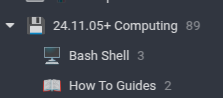
Here is the procedure to integrate it into the Linux desktop. Notably, the icon is still the beautiful blue icon, and not the atrocious black and white one that has taken center stage on Windows versions of the app.
chmod +x Joplin-3.4.12.AppImage
./Joplin-3.4.12.AppImage --appimage-extract
mv squashfs-root joplin-3.4.12
mv joplin-3.4.12 $HOME/Apps
cp $HOME/Apps/joplin-3.4.12/joplin.desktop $HOME/.local/share/applications
kate $HOME/.local/share/applications/joplin.desktop
Edit the file to say the following, but with $HOME replaced by the actual home directory of the relevant user:
[Desktop Entry]
Name=Joplin
Exec=$HOME/Apps/joplin-3.4.12/joplin --no-sandbox %U
Terminal=false
Type=Application
Icon=$HOME/Apps/joplin-3.4.12/joplin.png
StartupWMClass=Joplin
X-AppImage-Version=3.4.12
MimeType=x-scheme-handler/joplin;
Comment=Joplin for Desktop
Categories=Office;
Local download links:
Joplin-3.4.12 AppImage | Source as of 7 December 2025: joplin-dev-25.12.7
The last version that worked on OSX Catalina was 3.2.12.
LibreWolf 145 & Integrated AppImage
LibreWolf is a fork of Firefox that removes many of Mozilla’s bad decisions.1 A mirror of LibreWolf 145.0.1-2.x86_64 appimage is available here. Debian stable requires one to use a format other than the LibreWolf repo because as of 23 November, 2025 their site says the following:
sudo apt update && sudo apt install extrepo -y
sudo extrepo enable librewolf
sudo apt update && sudo apt install librewolf -y
Extrarepo exists only in Sid, which makes it unsuitable for Bookworm, or other stable Debian editions. Adding Sid repos can turn Debian into something akin to a rolling distribution but it can cause problems if one wants older software.
To integrate the linked appimage into the operating system, take the following actions.2
./LibreWolf.x86_64.AppImage --appimage-extract
mv squashfs-root librewolf-145.0.1-2
mv librewolf-145.0.1-2 $HOME/Apps
cp $HOME/Apps/librewolf-145.0.1-2/io.gitlab.LibreWolf.desktop $HOME/.local/share/applications
Then, modify the four lines in $HOME/.local/share/applications/io.gitlab.LibreWolf.desktop that say exec. Those lines need to reflect the path where the executable resides.
I was working on this with Obsidian and preparing to archive the appimage on this website when I ran into a snag. The Obsidian .desktop referenced the AppRun from the AppImage whereas Librewolf referenced the executable named librewolf. After resolving this, I checked the licenses. Obsidian distributes software that is under the Apache License. That license allows one to add other requirements to their additions to the software. Their additional term is that you may not redistribute their software. They are even more onerous that IBM was with Lotus Symphony 3. Lotus Symphony 3 was an office suite built on Open Office that had an excellent tabbed document interface. It was a beautiful interface that Open Office should have incorporated, but for some reason they did not. The Symphony 3 license allows you to redistribute on physical disc to your friends and family, but not via internet website. Obsidian says no to redistribution at all. I was using Obsidian extensively on all my mobile devices, but will have to discontinue using it now. I have no interest in building open source machines with open source operating systems and having software that does not allow you to mirror it.
./Obsidian-1.10.3.AppImage --appimage-extract
mv squashfs-root Obsidian-1.10.3
mv Obsidian-1.10.3 $HOME/Apps
cp $HOME/Apps/Obsidian-1.10.3/obsidian.desktop $HOME/.local/share/applications

Modify the exec line in $HOME/.local/share/applications/obsidian.desktop to reflect the path where the AppImage contents appear. The exec should point to the application binary and not the AppRun file. e.g. $HOME/Apps/Obsidian-1.10.3/obsidian
I will leave this here for memory and education, but will discontinue the use of Obsidian since its future as an ongoing concern is limited to their availability of their website as a distribution channel. That does not bode well. Symphony 3 (1.3 on Linux) is nearly extinct, but one can still run it on old virtual machines.
- Mozilla’s strategic direction seems to be toward operating as an advertising company that uses the software clients themselves as the vehicle for advertisements and user data rather than websites and advertising platforms showing advertisements on those sites.
- I use $HOME/Apps and $HOME/Applications to install programs like this rather than opt so that I can easily modify files or use them in backup scripts. Typically Apps contains smaller programs, and Applications contains larger ones such as GPT4ALL which consumes tens of gigabytes.
My refined direction is digital sovereignty
My refined direction is digital sovereignty via the old paths with a goal of writing at least one article per week. The complexity of the articles will change because many projects are planned for the long term, but getting started on them takes a very long time..
I setup a RAID 5 in my old computer using new Western Digital 2 TB drives. In this case, the old machine is a Hewlett Packard Z600. The computer is very old in computer years. It has 12 Cores via dual Intel(R) Xeon(R) CPUs of model X5675 at 3.07GHz. [1] The prices on these on eBay have gone through the roof for old desktops computers of many types. One can easily find conversations about hard drives from three or four years discussing prices of $15 per terabyte. Now they are over $30 per terabyte.
I had purchased a used 2TB drive to use as Samba share space in the machine, and it went bad and locked into read-only mode within about a year. In deciding whether to buy used or new drives, I came to the conclusion that on an annual basis, one ends up spending the same or more via used drives than they do with new drives. Were one to purchase used drives, twice as many need to be acquired which eliminates the financial benefit while increasing one’s stress.
I could not remember my Vivaldi sync password despite creating the account only a couple of days ago. I tried several times to remember it, and then connections to vivaldi.net started timing out. It seems to me that they blocked me. If that had happened with the ability to access my email, it would have been a real issue. Because of this, I need to work on a more digitally sovereign approach here.
The extensions I use for Vivaldi include the Obsidian Web Clipper, Joplin Web Clipper, Zotero Connector, floccus bookmarks sync, SingleFile, and uMatrix.
For LibreWolf, my extensions are Obsidian Web Clipper, SingleFile, Copy PlainText, floccus bookmarks sync, Joplin Web Clipper, Search by Image, Tree Style Tab, uMatrix, Undo Close Tab, and Web Archives.
- https://www.ebay.com/sch/179/i.html?_nkw=z600. Reviewed 11/1/2025, (Prices ranged from a single poorly described one for $160 with free shipping to $250 and 300 plus almost triple digit shipping costs. There were two pages total, and the entire last page was filled with $800 or $900 or even $1200 systems advertising things like 4 monitors for trading, 8 monitors, for trading and the like. The second best of all was 249.95 with free delivery.)
Running old versions of Java Minecraft
One source for the Java 8 (1.8) runtime is the Oracle Archives page. Another helpful one is the standard Java download page for the desktop Java Runtime Environment, JRE.
I downloaded the Linux x86 (32-bit) version even though the host is a 64bit Linux. The reason for that is that at some point in the point in the past Minecraft and various mods and the Forge loader required a 32 bit Java virtual machine (JVM). It was so problematic to install both 64bit and 32bit via the package managers and manually configure them, that I developed a practice of installing 32-bit Linux so that the Java in the repository would also be 32bit and then everything would be fin. It was much easier to run 32-bit Java and 32-bit Wine on a 32-bit operating system than reconfigure everything and try to switch between them depending on what was running.
I extracted the zip file from Oracle and then ran the Minecraft server instance with the following command.
home/username/Downloads/Java8_i586/jre1.8.0_461/bin/java -jar /home/username/Minecraft_x86/instances/b1.7.3/b1.7.3.251019/b1.7.3.jar nogui
Running the program that way worked very well.
.ssh config for Windows and Linux
The ~/.ssh/config file works for OpenSSH on Windows and for SSH on Linux.
To prevent disconnects, add the keepalive messages for all hosts. For specific hosts that use a specific key type, such as RSA on CentOS 6, add the specific algorithm via the HostkeyAlgorithms + functionality. To add a private key for SSH key logins, add the IdentityFile line. it is possible to allow the ssh-rsa algorithms on both outgoing and incoming connections for all hosts. The PubkeyAcceptedAlgorithms functionality is which key can be used to log into the host the config file sits on. the ForwardX11 setting sits on Linux hosts and not on Windows..
example ~/.ssh/config
IdentityFile ~/.ssh/Minecraft-Micro.pem

Host *
    ServerAliveInterval 40

Host 192.168.0.0
    HostkeyAlgorithms +ssh-rsa

ForwardX11 yes
HostKeyAlgorithms +ssh-rsa
PubkeyAcceptedAlgorithms +ssh-rsa
Switch a data volume on Linux
How to move /var/www/html/mydata/ to a new disk:
1. fdisk /dev/nvme4n1
1.i. create a new DOS partition and write it to disk
2. mkfs -t ext4 /dev/nvme4n1p1
3. lsblk -f (and copy the UUID for use in FSTAB)
3.i. a0e2e1e7-4034-4876-a005-ae5fcca39751
4. mount /dev/nvme4n1p1 /mnt
5. shopt -s dotglob
6. rsync -aulvXpogtr /var/www/html/mydata/* /mnt
7. edit /etc/fstab and replace the UUID for the data storage drive
8. mount -av to test
9. reboot
[_] Expand 7 to show fstab options
Minecraft Survival Multi-Player at memorymatrix.cloud
You can play Minecraft Survival Multiplayer. Review the game server’s Changelog to see recent changes. To play Minecraft, open the game, choose multiplayer, click “Add Server” and type memorymatrix.cloud in the Server Address field. Memory Matrix SMP is a Java-version Minecraft with regularly occurring allowances. Randomly enchanted books, experience, and iron are given out automatically Other allowances may occur by request. For some folks, emeralds are issued, for others name tags, an some even receive XP every 36 minutes.

- A view of Jack O Lantern town near world spawn on Memory Matrix SMP
There are no guarantees regarding the server and you play at your own risk. The server’s status is available from Minecraft Server Status by Anders G. Jørgensen, MCS, & Minehost, among others.
Debian 12 Sources
This is a listing of Debian sources for future reference. Debian maintains an archive of older versions on the Distribution Archives website. It may be necessary at some point in the future to change the bullseye information below so that it points to the distribution archives.
/etc/apt/sources.list.d/vivaldi.list
### THIS FILE IS AUTOMATICALLY CONFIGURED ###
# You may comment out this entry, but any other modifications may be lost.
deb [arch=amd64] https://repo.vivaldi.com/stable/deb/ stable main
End of File
/etc/apt/sources.list
#deb cdrom:[Debian GNU/Linux 12.4.0 _Bookworm_ - Official amd64 NETINST with firmware 20231210-17:56]/ bookworm main>

deb http://deb.debian.org/debian/ bookworm main non-free-firmware
deb-src http://deb.debian.org/debian/ bookworm main non-free-firmware

deb http://security.debian.org/debian-security bookworm-security main non-free-firmware
deb-src http://security.debian.org/debian-security bookworm-security main non-free-firmware

# bookworm-updates, to get updates before a point release is made;
# see https://www.debian.org/doc/manuals/debian-reference/ch02.en.html#_updates_and_backports
deb http://deb.debian.org/debian/ bookworm-updates main non-free-firmware
deb-src http://deb.debian.org/debian/ bookworm-updates main non-free-firmware

# Debian 12 "bookworm" dropped by Python2.  Adding Debian 11 "bullseye"
# removed bullseye non-free-firmware from each of the below bullseye lines
# due to errors on 7/24/25
deb http://deb.debian.org/debian/ bullseye main
deb-src http://deb.debian.org/debian/ bullseye main
deb http://security.debian.org/debian-security bullseye-security main
deb-src http://security.debian.org/debian-security bullseye-security main
deb http://deb.debian.org/debian/ bullseye-updates main
deb-src http://deb.debian.org/debian/ bullseye-updates main


# added 7/24/25
# https://fasttrack.debian.net/


deb http://fasttrack.debian.net/debian-fasttrack/ bookworm-fasttrack main contrib
deb http://fasttrack.debian.net/debian-fasttrack/ bookworm-backports-staging main contrib


# This system was installed using small removable media
# (e.g. netinst, live or single CD). The matching "deb cdrom"
# entries were disabled at the end of the installation process.
# For information about how to configure apt package sources,
# see the sources.list(5) manual.
End of File
Changelog for Memory Matrix SMP
This post serves as the changelog for the server and will receive future updates posted to it.
Legend:

[+] = Added
[*] = Changed
[^] = Moved
[=] = No Changes
[x] = Deleted
[!] = Bugs
[_] = To Do
[>] Migrated
[<] Migrated

29 July 2025:

[*] Random Books and Gilt Books: changed sweeping to sweeping_edge because the name of this enchantment changed from its historical name [1]
1. Java Edition 1.20.5, Minecraft Wiki
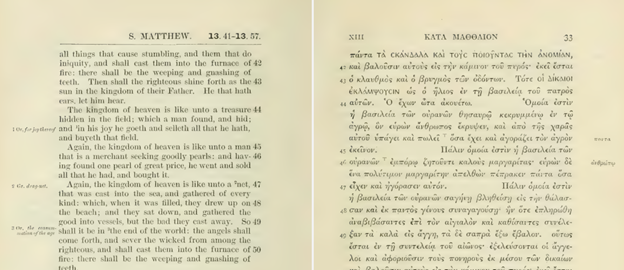
The 1881 Westcott and Hort Critical Text
The 1881 Westcott and Hort Critical Text is now available on this site. This contains their critical text and the Authorized Version of 1611, according to the front matter of the book. Their title includes the words "original Greek", but it very much is not the original Greek since it includes capitalization, diacritics, punctuation, hyphens, bracketed words, and spacing.
A Stephanus Greek, KJV, and ERV interlinear
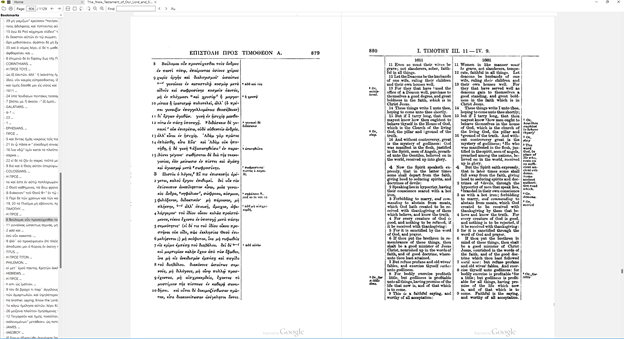
This site now has a copy of The Parallel New Testament Greek and English from Oxford University Press, 1896. This text contains the Authorized Version (KJV), the English Revised Version, and a Greek text based the third edition of Stephanus published in 1550. The two streams of Greek texts are the received stream via Erasumus/Beza/Elzevir/Stephanus/Scrivener and the critical stream via Westcott/Hort/Tischendorf. Texts within the same stream can differ, and other than Erasumus, I prefer the Stephanus. The reason is that Erasmus’ text lacked verse numbers and Stephanus added them. Stephanus is thus the oldest received text stream associated with the time of the publication of the KJV. Scrivener was late to the game, and while it is nice to have a newer Greek text in that stream, any new Greek text copywritten after the arrival of Tischendorf puts me off.
This is the Textus Receptus, also called the received text.
There are some differences in received text versions, some which are significant such as without where with should be and vice versa. [1]
Sumatra PDF reader (Local mirror of 3.5.2 64-bit) works wonderfully for viewing these kind of books. The following screenshot was taken with “Book View” on, and “Scroll Pages Continuously” activated. Librera is excellent for Android.
1. “Which Edition of the Received Text Should We Use?” Accessed July 12, 2025. https://www.wayoflife.org/reports/which_edition_of_received_text_should_we_use.html.
