Configuring xrdp on Debian 12 and keeping it operational proved to be a great pain. I attempted to modify ~/.Xession to launch lxsession rather than Cinnamon since that Cinnamon configuration kept resultinig in a closed XRDP connection right after connection started but before the desktop actually loaded. The details about the reason for crashing were in /var/log/xrdp-sesman.log while xrdp.log contained much briefer status notes. The system boots into graphical target mode and that is controlled by SystemD since it is a system D Distribution. XRDP cannot share a dbus session with the console graphical interface login. Configuring the system to start in the equivalent of init 3 systemctl set-default multi-user.target will cause the system to boot to a standard terminal login rather than the graphical user interface.
Some of the troubleshooting included:
I changed /etc/xrdp/sesman.ini to kill disconnected sessions 1 second after disconnect, and changed .xsession to startplasma-x11, but it loaded to a black screen instead of a plasma desktop. It did however not crash, but plasma itself failed to work. So I changed /home/robert/.xsession to say cinnamon --replace and it worked. But that was a complicating factor. Trying to launch it again failed. Changing .xsession to lxsession allowed it to open again, but it still opened the existing cinnamon screen. I know it was the existing screen because I left a file manager window open and that window was still open. So I changed back to XFCE for troubleshooting. SSH errors presented as a potential sourceof the problem.
The specific error message was SSH authentication agent is already running gpg-agent: a gpg-agent is already running - not starting a new one so I used
ps aux | grep ssh-agent and killed all the xsessions associated ssh agents and tried with Cinnamon again. and received a new set of errors: xsession xrdp cinnamon already exists on bus and --replace not specified. Ater trying other sessions and seeing error messages about existing sessions on debus, I believe that the other sessions are remaining open when closed so when I try to connect to the same desktop environment again, whether it be plasma, xfce, etc, then it fails due to the issue with systemd and graphical sessions
I changed /etc/xrdp/sesman.ini to automatically close disconnected sesssions after 300 seconds. It was set to never close a disconnected session. The idea for this came from a suggestion of allowing multiple sessions per user, which is wrong and seems like AI copy-pasta because you cannot have multiple sessions per user with the same graphical environment due to the limitations of SystemD and DBUS. However, it did point me to the research that made me identify the potential issue of the session I want occupying a spot in the dbus queue that cannot be reclaimed with a new login. That resulted in a identifying the details from the Frequently Asked Questions [1] that it is not possible on a SystemD system to bloth login locally on the machine and remotely via XRDP. The Automatic closing of the sessions might have worked, but I did not reboot the system because it runs several virtual machines that I did not want to shut down.
I therefore decided to do away with XRDP on this server and use X over SSH as a simple replacement. One of the reasons I had not done that already is Dropbox. The graphical Dropbox client is the only way to move the Dropbox folder to a different drive. I have tried using mklink and it failed to allow the files to actually store on a different drive. Dropbox seemed to overwrite the link itself and store the files in ~/dropbox no matter what efforts one placed into ensuring their movement. Therefore I wanted to have that ability without having to physically log in to that machine with a monitor present. I have never liked VNC as a technology stack.
I purged the XRDP configurations via apt autoremove --purge xrdp xorgrdp and checked directories to make sure the files were gone.
To start an X session without using the addon software packages, use x-session-manager &. If one fails to include the &, the session will close when one closes the terminal that opened it. I logged into the machine using ssh -X and typed x-session-manager.
To pick the default one that opens, use update-alternativees --config x-session-manager. This is the output of that screen on the server in question.
  Selection    Path                       Priority   Status
------------------------------------------------------------
* 0            /usr/bin/startxfce4         50        auto mode
  1            /usr/bin/cinnamon-session   50        manual mode
  2            /usr/bin/lxsession          49        manual mode
  3            /usr/bin/openbox-session    40        manual mode
  4            /usr/bin/startlxde          50        manual mode
  5            /usr/bin/startplasma-x11    40        manual mode
  6            /usr/bin/startxfce4         50        manual mode
  7            /usr/bin/xfce4-session      40        manual mode
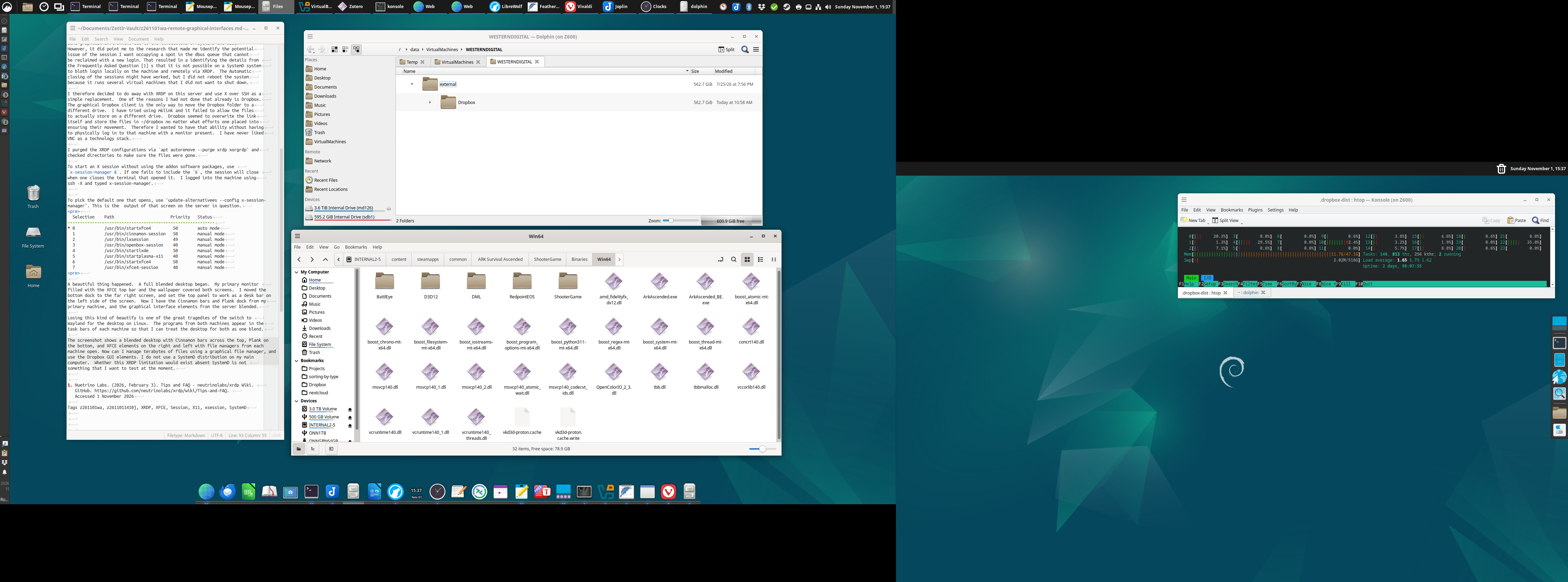
A beautiful thing happened. A full blended desktop began. My primary monitor filled with the XFCE top bar and the wallpaper covered both screens. I moved the bottom dock to the far right screen, and set the top panel to work as a desk bar on the left side of the screen. Now I have the Cinnamon bars and Plank dock from my primary machine, and the graphical interface elements from the server blended. Losing this kind of beauty is one of the great tragedies of the switch to Wayland for the desktop on Linux. The programs from both machines appear in the task bars of each machine so that I can treat the desktop for both as one blend.
The screenshot shows a blended desktop with Cinnamon bars across the top, Plank on the bottom, and XFCE elements on the right and left with file managers from each machine open. Now can I manage terabytes of files using a graphical file manager, and use the Dropbox GUI elements. I do not use a SystemD distribution on my main computer. Whether this XRDP limitation would exist absent SystemD is not something that I want to test at the moment.
1. Nuetrino Labs. (2026, February 3). Tips and FAQ – neutrinolabs/xrdp Wiki. GitHub. https://github.com/neutrinolabs/xrdp/wiki/Tips-and-FAQ. Accessed 1 November 2026